
IM SDK for HarmonyOS 开发指引
sdk名称:游密即时通信SDK
包名:@youme/im
版本号:3.0.26
更新日期:2026-04-02
md5值:f3bb6504dea0726a27d43501c116f95e
开发者:游密科技(深圳)有限公司
隐私政策:SDK隐私政策
合规指引:SDK合规使用指南
概述
游密即时通讯SDK(IM SDK)为玩家提供完整的游戏内互动服务,游戏开发者无需关注IM通讯复杂的内部工作流程,只需调用IM SDK提供的接口,即可快速实现世界聊天、公会聊天、组队聊天、文字、表情、语音等多项功能。
IM SDK接口调用顺序
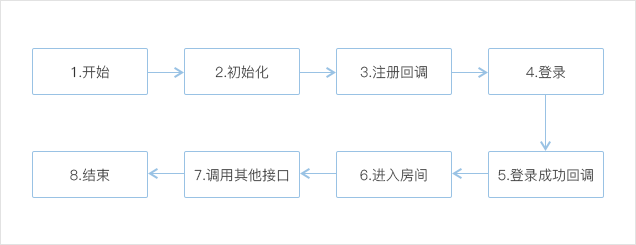
四步集成IM SDK
第一步 注册账号
在游密官网注册游密账号。
第二步 添加游戏,获取Appkey
在控制台添加游戏,获得接入需要的Appkey、Appsecret。
第三步 下载IM SDK包体
第四步 开发环境配置
快速接入
1. 导入IM SDK
环境要求:
DevEco Studio版本: 5.0.0 Release(Build Version: 5.0.3.910)及以上
HarmonyOS SDK版本: 5.0.0 Release(API Version 12 Release)及以上
手机系统OpenHarmony版本:5.0.0.31(Beta2)及以上
导入SDK
两种方法导入HAR包:
1. 手动导入
下载youme_im_3.0.11.har包,放到⼯程libs中。在⼯程中配置引⽤:
"dependencies": {
"@youme/im":"file:./libs/youme_im_3.0.11.har",
}
2. ohpm导入
在⼯程中配置:
"dependencies": {
"@youme/im":"3.0.11",
}
运⾏命令:
ohpm install @youme/im权限申请
在模块的 module.json5 中 requestPermissions添加网络和麦克风权限,配置如下:
"requestPermissions": [
  {
    "name": "ohos.permission.INTERNET",
  },
  {
    "name": "ohos.permission.MICROPHONE",
    "reason": "$string:mic_reason",
    "usedScene": {
      "abilities": [
        "FormAbility"
      ],
      "when": "inuse"
    }
  }
使用Native C++接口
har包安装在该模块的oh_modules目录,目录下有提供 Native C++ 的 include头文件 和 so库文件。
若要使用Native C++接口,可以再CMake里配置使用。
C++接口API说明书请参考 IM SDK for C++使用指南。
#CMakeLists.txt示例

#包含include目录
include_directories(${CMAKE_CURRENT_SOURCE_DIR}/../../../oh_modules/@youme/im/include)
#包含so的目录
link_directories("../../../oh_modules/@youme/im/libs/${OHOS_ARCH}")
#把libyim.so添加到链接库里
target_link_libraries(entry PUBLIC libace_napi.z.so libhilog_ndk.z.so libyim.so)//papi_init.cpp 引用示例
#include "YIM.h"
#include "YIMPlatformDefine.h"
...
//使用C++回调接口IYIMLoginCallback
class CNAPICallback: public IYIMLoginCallback
{
public:
/*
* 功能:登录回调
* @param errorcode:错误码
* @param userID:用户ID
*/
virtual void OnLogin(YIMErrorcode errorcode, const XCHAR * userID) {
OH_LOG_INFO(LOG_APP, "login with code %d", errorcode);
if(errorcode == YIMErrorcode_Success) {
YIMManager::CreateInstance()->GetChatRoomManager()->JoinChatRoom(ROOM_NAME);
}
}
};
...
//使用YIMManager主接口
XString ver = YIMManager::CreateInstance()->GetSDKVersion();
static auto cb = new CNAPICallback;
YIMManager::CreateInstance()->SetLoginCallback(cb);
YIMManager::CreateInstance()->SetServerZone(ServerZone_China);
auto code = YIMManager::CreateInstance()->Init(APP_KEY, APP_SECRET, "");
```
### 2. 初始化
成功导入SDK后,应用启动的第一时间需要调用初始化接口。
#### import包名
`import { YIMClient, YIMObserver, YIMDefine, YIMMessage } from '@youme/im'`
YIMClient是一个单例类,可以通过.getInstance()获取到它的实例。通过它就可以调用IM SDK的API接口。
<a id="初始化IMSDK"></a>
#### 初始化IM SDK
- __调用示例:__
`let error: YIMDefine.YIMErrorcode = YIMClient.getInstance().init(this.appCustom.appKey, this.appCustom.appSecret, this.selectedZone);`
- **接口与参数:**
- `初始化接口` :
`init(appKey:string, appSecret:string, serverZone: YIMDefine.YIMServerZone, packageName:string = "", sdkValidDomain:string = "", drDomain:string = "", sdkValidBackupip:string = "", drBackupip:string = ""): YIMDefine.YIMErrorcode`
- `appKey` :用户游戏产品区别于其它游戏产品的标识,可以在[游密官网](https://console.youme.im/)获取、查看。
- `appSecret` :用户游戏产品的密钥,可以在[游密官网](https://console.youme.im/)获取、查看。
- `serverZone` :IM服务器区域,一般使用 `0` -中国,其余设置值查看[服务器部署地区定义](IMSDKHarmonyOS.php#服务器部署地区定义)。
- __返回值:__
- `YIMErrorcode` :错误码,详细描述见[错误码定义](IMSDKHarmonyOS.php#错误码定义)。
- __备注:__
此接口本是异步操作,未给出异步回调,一般返回的错误码是Success即表示初始化成功。
### 3. 监听全局回调
IM引擎的一些消息通知是需要设置全局回调来接收的,比如其他人进出房间,消息接收等。\
新建一个YIMObserver对象,处理您感兴趣的回调,然后添加到IM引擎的观察者列表,就可以完成了。\
如果不需要接收消息了,可以从观察者列表中删除。\
具体的全局回调类型请查看API接口。
- **调用示例:**
``` javascript
import { YIMClient, YIMObserver, YIMDefine, YIMMessage } from '@youme/im'
...
observer: YIMObserver = new YIMObserver();
...
// 设置监听
YIMClient.getInstance().addObserver(this.observer);
...
// 回调接口实现
this.observer
.onReceiveMessage((msg: YIMMessage.Msg) => {
//接收别人发送的消息
...
})
.onOtherJoinRoom((room, user) => {
//其他人进入房间
...
})
.onOtherLeaveRoom((room, user) => {
//其他人离开房间
...
})
.onUpdateReadStatus((recvID: string, chatType: YIMDefine.YIMChatType, msgSerial: bigint) => {
//其他人已读了某条消息
...
})
...
}-
接口:
添加观察者接口:addObserver(observer: YIMObserver)移除观察者接口:deleteObserver(observer: YIMObserver)
4. 登录IM系统
成功初始化IM后,调用IM SDK登录接口登录IM系统。
-
调用示例:
JavaScript Button('用户登录') .onClick(() => { let errcode: YIMDefine.YIMErrorcode = YIMClient.getInstance().login(this.userId, this.password, "", (errCode: YIMDefine.YIMErrorcode, user: string) => { if(errCode == YIMDefine.YIMErrorcode.YIMErrorcode_Success) { ... } else { hilog.error(0x0000, 'YOUMEIM_DEMO_UI', `callback:login err:${errCode} user:${user}`); .. } }); }) -
接口与参数:
-
登录接口:login(user: string, password:string, token: string, callback: (errCode: YIMDefine.YIMErrorcode, user: string) => void) : YIMDefine.YIMErrorcode -
user:由调⽤者分配,不可为空字符串,只可由字母或数字或下划线组成,用户首次登录会自动注册所用的用户ID和密码。 -
password:⽤户密码,不可为空字符串,由调用者分配,二次登录时需与首次登录一致,否则会报UsernamePasswordError。 -
token:用户验证token,可选,如不使用token验证传入:""。 -
callback:登录回调。
-
5. 进入聊天频道
登录成功后,如果有群组聊天需要,比如游戏里面的世界、工会、区域等,需要进入聊天频道;调用方为聊天频道设置一个唯一的频道ID,可以进入多个频道。
-
调用示例:
JavaScript Button('加入聊天室') .onClick(() => { let errcode :YIMDefine.YIMErrorcode = YIMClient.getInstance().joinChatRoom(this.roomId, (err, room) => { if(err == YIMDefine.YIMErrorcode.YIMErrorcode_Success) { this.getRoomMemberCount(room); ... } else { hilog.error(0x0000, 'YOUMEIM_DEMO_UI', `callback:join_room err:${err} room:${room}`); ... } }); if(errcode != YIMDefine.YIMErrorcode.YIMErrorcode_Success) { ... } }) -
接口与参数
-
进入频道接口:joinChatRoom(room: string, callback: (errCode: YIMDefine.YIMErrorcode, room: string) => void) : YIMDefine.YIMErrorcode -
room:请求加入的频道ID,仅支持数字、字母、下划线组成的字符串,区分大小写,长度限制为255字节。 -
callback:加入频道回调。
-
6. 发送文本消息
在成功登录IM后,即可发送IM消息。
-
调用示例:
JavaScript // 发送文本消息 Button('发送文字') .onClick(() => { let out: [YIMDefine.YIMErrorcode, bigint] = YIMClient.getInstance().sendTextMessage(this.sendTo, YIMDef.YIMChatType.ChatType_PrivateChat, this.msgToSend, "", (reqId: bigint, errCode: YIMDefine.YIMErrorcode, sendTime: number, isForbidRoom: boolean, reasonType: number, forbidEndTime: number, msgId: bigint)=>{ if(errCode == YIMDefine.YIMErrorcode.YIMErrorcode_Success) { ... } else { hilog.error(0x0000, 'YOUMEIM_DEMO_UI', `callback:send_msg_status err:${errCode} reqId:${reqId} sendTime:${sendTime} msgId:${msgId}`); ... } }); if(out[0] == YIMDefine.YIMErrorcode.YIMErrorcode_Success) { ... } else { ... } }) -
接口与参数:
-
发文本消息接口:sendTextMessage(receiver: string, chatType: number, msg: string, param: string, callback: funcOnSendMessage) : [YIMDefine.YIMErrorcode, bigint] -
receiver:接收者ID,私聊传入用户ID,频道聊天传入频道ID。 -
chatType:聊天类型,私聊传1,频道聊天传2;需要频道聊天得先成功进入频道后发文本消息,此频道内的成员才能接收到消息。 -
msg:聊天内容。 -
param: 发送文本附加信息。 -
callback:发送文本消息回调。
-
-
发送文本消息回调::
funcOnSendMessage = (reqId: bigint, errCode: YIMDefine.YIMErrorcode, sendTime: number, isForbidRoom: boolean, reasonType: number, forbidEndTime: number, msgId: bigint) => void:reqId: 消息序列号,用于校验一条消息发送成功与否的标识,long类型。
errCode: 错误码。sendTime: 消息发送时间,long类型。
isForbidRoom: 若发送的是频道消息,显示在此频道是否被禁言,true-被禁言,false-未被禁言,boolean类型。
reasonType: 若在频道被禁言,禁言原因类型,0-未知,1-发广告,2-侮辱,3-政治敏感,4-恐怖主义,5-反动,6-色情,7-其它,int类型。
forbidEndTime: 若在频道被禁言,禁言结束时间,long类型。
msgId: 返回服务器messageID,与接收消息时的getMessageID()是统一的。 -
拓展功能: 发送消息时,可以将玩家头像、昵称、角色等级、vip等级等要素打包成json格式发送。
7. 发送语音消息
在成功登录IM后,可以发送语音消息。
- 按住语音按钮时,调用
StartRecordAudioMessage接口,启动录音。- 松开按钮,调用
StopAndSendAudioMessage接口,发送语音消息。- 按住过程若需要取消发送,调用
cancelAudioMessage取消本次语音发送。
-
调用示例:
JavaScript Button(this.speek_btn_text) .onTouch(async (event:TouchEvent) => { if(event.type == TouchType.Down) { // 启动语音 let out: [YIMDefine.YIMErrorcode, bigint] = YIMClient.getInstance().StartRecordAudioMessage(this.sendTo, YIMDefine.YIMChatType.ChatType_RoomChat, (reqId: bigint, errCode: YIMDefine.YIMErrorcode, text: string, audioPath: string, audioTime: number, sendTime: number, isForbidRoom: boolean, reasonType: number, forbidEndTime: number, msgId: bigint) => { if(errCode == 0) { ... } else { hilog.error(0x0000, 'YOUMEIM_DEMO_UI', `callback:send_audio_msg_status err:${errCode} reqId:${reqId} sendTime:${sendTime} msgId:${msgId}`); ... } }, (reqId: bigint, errCode: YIMDefine.YIMErrorcode, text: string, audioPath: string, audioTime: number) => { hilog.info(0x0000, 'YOUMEIM_DEMO_UI', `开始发送语音回调,请求ID:${reqId} code:${errCode} \n`); }); if(out[0] == YIMDefine.YIMErrorcode.YIMErrorcode_Success) { ... } }else if(event.type == TouchType.Up) { // 停止并发送语音消息 let ret: YIMDefine.YIMErrorcode = YIMClient.getInstance().StopAndSendAudioMessage(''); } }) -
接口与参数:
-
发送语音消息接口:StartRecordAudioMessage(receiver: string, chatType: number, complete: (reqId: bigint, errCode: YIMDefine.YIMErrorcode, text: string, audioPath: string, audioTime: number, sendTime: number, isForbidRoom: boolean, reasonType: number, forbidEndTime: number, msgId: bigint) => void, before_send?: (reqId: bigint, errCode: YIMDefine.YIMErrorcode, text: string, audioPath: string, audioTime: number) => void) : [YIMDefine.YIMErrorcode, bigint] -
结束录音接口:StopAndSendAudioMessage(extra: string) : YIMDefine.YIMErrorcode -
取消录音接口:cancelAudioMessage() : YIMDefine.YIMErrorcode -
receiver:接收者ID(⽤户ID或者频道ID)。 -
chatType:消息类型,表示私聊还是频道消息。 -
extra:发送语音消息附加信息,主要用于调用方特别需求。
-
-
回调接口与参数:
发送完成回调complete: (reqId: bigint, errCode: YIMDefine.YIMErrorcode, text: string, audioPath: string, audioTime: number, sendTime: number, isForbidRoom: boolean, reasonType: number, forbidEndTime: number, msgId: bigint) => void录音完成,开始发送时回调before_send: (reqId: bigint, errCode: YIMDefine.YIMErrorcode, text: string, audioPath: string, audioTime: number) => voidreqId: 消息序列号,用于校验一条消息发送成功与否的标识,long类型。
errCode: 错误码。text: 语音转文字识别的文本内容,如果带语音转文字参数为false,该字段为空字符串。audioPath: 录音生成的wav文件的本地完整路径。audioTime: 录音时长(单位秒)。sendTime: 消息发送时间,long类型。
isForbidRoom: 若发送的是频道消息,显示在此频道是否被禁言,true-被禁言,false-未被禁言,boolean类型。
reasonType: 若在频道被禁言,禁言原因类型,0-未知,1-发广告,2-侮辱,3-政治敏感,4-恐怖主义,5-反动,6-色情,7-其它,int类型。
forbidEndTime: 若在频道被禁言,禁言结束时间,long类型。
msgId: 返回服务器messageID,与接收消息时的getMessageID()是统一的。 -
备注:
语音消息发送成功,接收方会收到onReceiveMessage回调,能从该回调中下载语音文件。
8. 接收消息
- 通过
onReceiveMessage接口被动接收消息,需要开发者实现
-
调用示例:
JavaScript this.observer .onReceiveMessage((msg: YIMMessage.Msg) => { if (msgType == YIMDef.YIMMessageBodyType.MessageBodyType_TXT) { //收到文本消息 ... } else if (msgType == YIMDef.YIMMessageBodyType.MessageBodyType_Voice) { //收到语音消息 ... //下载这条语音消息 YIMClient.getInstance().downloadFile(msg.msgId, "", (errCode: YIMDefine.YIMErrorcode, message: YIMMessage.Msg, path: string) => { if (errCode == 0) { //下载成功 ... //播放这条语音 YIMClient.getInstance().startPlayAudio(path); } else { hilog.error(0x0000, 'YOUMEIM_DEMO_UI', `callback:download_file err:${errCode} msgId:${msg.msgId}`); ... } }); return; } else { //收到其他类型消息 ... return; } })
9. 接收语音消息并播放
- 通过
msgType分拣出语音消息(YYIMDefine.IMMessageBodyType.MessageBodyType_Voice)。- 用
msgId获得消息ID。- 调用
downloadFile接口下载语音消息。- 成功下载语音消息后,调用
startPlayAudio接口播放语音消息。
-
调用示例:
JavaScript //下载这条语音消息 YIMClient.getInstance().downloadFile(msgId, "", (errCode: YIMDefine.YIMErrorcode, message: YIMMessage.Msg, path: string) => { if (errCode == 0) { //下载成功 ... //播放这条语音 YIMClient.getInstance().startPlayAudio(path); } else { hilog.error(0x0000, 'YOUMEIM_DEMO_UI', `callback:download_file err:${errCode} msgId:${msgId}`); ... } }); -
接口和参数:
-
下载语音消息接口:downloadFile(messageID: bigint, path: string, callback: (errCode: YIMDefine.YIMErrorcode, message: YIMMessage.Msg, path: string) => void -
播放语音消息接口:startPlayAudio(path: string) : YIMDefine.YIMErrorcodemessageID:消息ID。path:语音文件保存路径。path:待播放文件路径。callback:回调。
-
-
回调接口与参数:
下载语音接口是异步操作,下载语音成功的标识是onDownload回调的错误码为Success,调用downloadFile接口同步返回值是Success才能收到onDownload回调。成功下载语音消息后即可播放语音消息。-
下载回调接口:(errCode: YIMDefine.YIMErrorcode, message: YIMMessage.Msg, path: string) => void: -
errCode:错误码。 -
message:消息基类。 -
path:保存路径。
-
10. 登出IM系统
注销账号时,调用登出接口logout登出IM系统。
-
调用示例:
JavaScript Button('用户登出') .onClick(() => { YIMClient.getInstance().logout((errCode:nuYIMDefine.YIMErrorcodember) => { if(errCode == 0) { ... } else { hilog.error(0x0000, 'YOUMEIM_DEMO_UI', `callback:logout err:${errCode}`); ... } }); }) -
接口:
登出接口:logout(callback: (errCode: YIMDefine.YIMErrorcode) => void) : YIMDefine.YIMErrorcode
典型场景集成方案
主要分为世界频道聊天,用户私聊,直播聊天室;集成的时都需要先初始化SDK,登录IM系统。
启动应用,初始化SDK
应用启动的第一时间需要调用初始化接口。
-
接口与参数:
-
代码示例与详细说明:
登录应用时,登录IM系统

- 点击
登录按钮时,调用IM SDK登录接口。
-
接口与参数:
login:登录接口。user:由调⽤者分配,不可为空字符串,只可由字母或数字或下划线组成。password:⽤户密码,不可为空字符串。token:用户验证token,可选,如不使用token验证传入:""。callback:登录回调。
-
代码示例与详细说明:
典型场景
世界频道聊天

- 进入应用后,调用加入频道接口,进入世界、公会、区域等需要进入的聊天频道。
- 应用需要为各个聊天频道设置一个唯一的频道ID。
- 成功进入频道后,发送频道消息,文本、语音消息等。
-
接口与参数
joinChatRoom:加入频道。room:请求加入的频道ID。callback:加入频道回调。
-
代码示例与详细说明:
用户私聊
直播聊天室
- 用户集成直播SDK后,导入IM SDK。
- 初始化IM SDK。
- 登录IM 系统。
- 进入指定的聊天频道。
- 发送频道消息(例如:弹幕式),调用流程查看发送文本消息。
文本消息发送

- 点击发送按钮,调用发消息接口,将输入框中的内容发送出去。
- 发送出的消息出现在聊天框右侧。
- 表情消息可以将表情信息打包成Json格式发送。
-
相关接口与参数:
sendTextMessage:发文字消息接口。receiver:接收者ID,私聊传入用户ID,频道聊天传入频道ID。chatType:聊天类型,私聊/频道聊天。msg:聊天内容。param: 发送文本附加信息。callback:发送文本消息回调。
-
代码示例与详细说明:
-
拓展功能: 发送消息时,可以将玩家头像、昵称、角色等级、vip等级等要素打包成json格式发送。
语音消息发送

- 按住语音按钮时,调用
StartRecordAudioMessage。- 松开按钮,调用
StopAndSendAudioMessage接口,发送语音消息。- 按住过程若需要取消发送,调用
cancelAudioMessage取消发送。
-
相关接口与参数:
StartRecordAudioMessage:发送语音消息接口。StopAndSendAudioMessage:结束录音接口。cancelAudioMessage:取消录音接口。receiver:接收者ID(⽤户ID或者频道ID)。chatType:消息类型,表示私聊还是频道消息。extra:语音消息附带信息。
-
代码示例与详细说明:
接收消息

- 通过
onReceiveMessage接口被动接收消息,需要开发者实现,接收消息进行相应的展示,如果是语音消息需要下载语音,以及下载完成后的语音播放。
-
相关接口与参数:
onReceiveMessage:收消息接口。
-
代码示例与详细说明:
接收语音消息和播放

- 通过
msgType分拣出语音消息(YIMMessageBodyType.MessageBodyType_Voice)。- ⽤
msgId获得消息ID。- 点击语音气泡,调用
downloadFile接口下载语音文件。- 调用方播放语音文件。
-
相关接口与参数:
-
downloadFile:下载语音文件接口。 -
startPlayAudio:播放语音文件接口。messageID:消息ID。path:保存路径。callback:回调。
-
-
代码示例与详细说明:
登出IM系统

- 如下两种情况需要登出IM系统:
- 注销账号时,调用
logout接口登出IM系统。- 退出应用时,调用
logout接口登出IM系统。
-
相关接口:
logout:登出接口。
-
代码示例与详细说明: